
Please read every word of these instructions carefully to avoid unnecessary back-and-forth between you, me (the guarantor), and the college. I have seen many avoidable stressful situations arise simply because the instructions were not followed.
You will need a Guarantor to complete your Qualification Application. The guarantor has to sign your form (downloadable from here) and attest your Govt issued photo ID.
You may obtain assistance from any eligible guarantor as mentioned in CICC’s guideline (mentioned in the page below). However, if you need support, I (Sid Rahman, RCIC-IRB) am happy to help — there is no fee for this service.
Guarantor / attestation
Who can be your Guarantor?
According to CICC’s guidelines, a person other than the candidate, applicant or licensee who can confirm the candidate, applicant or licensee’s identity and who may be called upon to confirm personal information.
The guarantor (must be a Canadian citizen) or referee (both Canadian citizen and non Canadian citizen are ok) must be an individual who works in a federally, provincially or territorially regulated industry in Canada, is a member in good standing of that industry’s professional body and can provide their licensee or registration number, if applicable.
If you choose to send it to me, please ensure that all of my information is already completed exactly as provided below. I will only be adding my signature and the date.
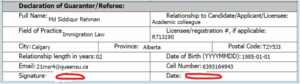
IMPORTANT NOTE
- Regardless of whether the form is signed electronically or with a wet signature, the signature(s) must exactly match as shown on the government-issued ID.
- All the names filled up in your form must exactly match as shown on the government-issued ID.
- You must sign before you send to me.
- You may complete the entire form either by hand or by typing—whichever method you prefer—provided that all information is clear, legible, and easy to understand.
If there is technical glitch with city name: If you notice that the form does not allow you to enter both your city and my city (“Calgary”)—for example, when updating one field automatically changes the other—please leave both city fields blank. This is a known technical glitch.
Once I return the document to you with my signature and date, you may print it, write both city names manually, and then scan and upload it to your college portal.
Photo ID Submission Instructions
Please provide a government (Canada or any other country) issued photo ID, such as a Driver’s License, Passport, or Provincial ID. Kindly follow the instructions below to ensure your submission meets CICC requirements:
- Insert a clear, coloured scanned copy of your photo ID into a Microsoft Word document. Blurry or low-quality copies will be rejected by CICC. If you are submitting a Driver’s Licence, PR card, or Provincial ID that contains information on both sides, please ensure that you scan and upload both sides of the document.
- At the bottom of the photo, include the following declaration (see sample format below). I will sign and date it afterward.
Place your PHOTO IDDriving License / Passport / Provincial ID |
| I certify this to be the true likeness of FULL NAME (Candidate’s name as per Govt ID)
Attested by:
Md Siddiqur Rahman, RCIC-IRB (R713190) Date: YYYY-MM-DD (Please put the date as you send) City, province, country during attestation: Calgary, AB, Canada.
|
IMPORTANT NOTE:
- Your ID must contain your signature.
- Don’t forget to omit FULL NAME and YYYY-MM-DD, put the name and date in the respective fields.
- If you only send the photo without the required declaration (you name and my details) as mentioned above, I will not sign or attest it. Thank you for your kind understanding.
- Please try to place both your ID (front and back, if applicable) and the declaration on the same page. If two pages are unavoidable, the declaration must appear at the bottom of both pages; otherwise, the college may return the ID for re-attestation.
Once completed,
- Please make sure to send the form and ID for attestation in PDF format only (no other format is acceptable)
- Please email to: support@immimentor.ca and expect my reply within maximum 12 hours window.
Thank you.
Sid Rahman, RCIC-IRB (R713190)
Founder and Mentor,
ImmiMentor Inc.
Email: support@immimentor.ca
Cell / WhatsApp: +1(639) 316-4943
Services we provide to EPE candidates can be found here